
Download Webuters – AI Writing Assistant, Content Automation, Free & Secure Tool
Overview of Webuters
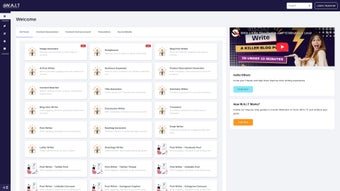
Webuters is a next‑generation AI writing assistant platform built around the powerful engine called WAIT. Designed for marketers, freelancers, and anyone who needs to produce high‑quality copy quickly, Webuters bundles a range of intelligent tools into a single, easy‑to‑navigate interface. From personalized greetings and content summaries to automated title generation, hashtag suggestions, and multilingual translation, WAIT acts as a virtual co‑author that learns your style and adapts to the task at hand.
The platform offers both a free tier for casual users and tiered premium plans that unlock advanced capabilities such as bulk content rewriting, custom tone presets, and API access for enterprise integration. Whether you are drafting an email, crafting a social‑media post, or translating a blog article into several languages, Webuters streamlines repetitive writing chores, allowing you to focus on strategy and creativity. Security is baked in – all data is encrypted in transit, and the service complies with GDPR and CCPA standards, ensuring that your drafts remain private.
In short, Webuters positions itself as an all‑in‑one, secure, and scalable solution for modern content creation, promising to boost productivity while maintaining a high standard of linguistic quality.
Key Features That Set Webuters Apart
- Personalized Greetings: Generate warm, context‑aware introductions for emails, letters, or chat messages in seconds.
- Content Summaries: Instantly condense long articles, reports, or research papers into concise summaries without losing essential information.
- Title & Headline Generator: Produce click‑worthy titles optimized for SEO, social sharing, and audience engagement.
- Content Rewriter: Rewrite paragraphs to avoid duplication, adjust tone, or tailor the voice for different platforms.
- Hashtag Generator: Suggest relevant, trending hashtags for Instagram, Twitter, LinkedIn, and TikTok based on your content.
- Social Media Post Builder: Guided templates for Facebook, LinkedIn, and Pinterest posts that incorporate best‑practice length and formatting.
- Email & Letter Composer: Automated drafts for professional outreach, newsletters, or formal correspondence, complete with subject line suggestions.
- Multilingual Translation: Translate text into over 30 languages, preserving nuance and idiomatic expressions for global audiences.
- Bulk Processing: Premium users can upload CSV files to generate or rewrite dozens of entries in a single batch.
- API Integration: Seamlessly embed WAIT’s capabilities into your own apps, CRMs, or content management systems.
Each feature is powered by state‑of‑the‑art natural language processing models that have been fine‑tuned on diverse datasets, ensuring high relevance across industries. The platform also includes a “learning mode” where you can feed the AI examples of your preferred style; over time, WAIT adapts, delivering output that feels genuinely yours. For teams, Webuters offers collaborative workspaces where multiple users can share drafts, leave comments, and approve content in a controlled environment, making it a solid choice for agencies and marketing departments.
Installation, Usage Instructions & Compatibility
Getting Started – Simple Download & Setup
Webuters is a cloud‑based SaaS solution, so there is no traditional installation required on your device. To begin, visit the official website, click the Download button, and create a free account using your email or a single‑sign‑on (SSO) provider such as Google or Microsoft. After email verification, you will be directed to the dashboard where the WAIT interface loads instantly in any modern browser.
Step‑by‑Step Workflow
- Log In: Access the dashboard with your credentials.
- Select a Tool: Choose from the left‑hand menu – e.g., “Title Generator” or “Translation”.
- Enter Prompt: Type or paste the source text, set the desired tone, language, or length.
- Generate: Click “Run” and watch WAIT produce the output within seconds.
- Edit & Refine: Use the built‑in editor to tweak the result, then copy to clipboard or export as .txt, .docx, or .csv.
- Save to Workspace: For premium users, store the draft in a shared folder for team review.
Operating System Support
Because Webuters runs entirely in the browser, it is compatible with all major operating systems, including Windows 10/11, macOS Catalina and later, Linux distributions, as well as mobile platforms like Android 8+ and iOS 13+. The responsive design ensures a smooth experience on desktops, tablets, and smartphones, allowing you to create content on‑the‑go without sacrificing functionality.
Security & Updates
The service receives automatic updates, so you always benefit from the latest AI model improvements, bug fixes, and security patches without manual intervention. All communications between your device and Webuters’ servers are protected by TLS 1.3 encryption, and data at rest is stored in encrypted databases compliant with GDPR and CCPA. For enterprise plans, additional options such as single‑sign‑on (SSO), role‑based access control, and audit logs are available.
Pros, Cons, Frequently Asked Questions & Final Thoughts
Pros
- All‑in‑one AI suite eliminates the need for multiple specialized tools.
- Intuitive UI suitable for beginners and power users alike.
- Robust multilingual translation covering over 30 languages.
- Secure, GDPR‑compliant data handling with end‑to‑end encryption.
- Flexible pricing – free tier for casual users, scalable premium plans.
- API access enables custom integration with existing workflows.
Cons
- Advanced features such as bulk processing and API access are locked behind paid plans.
- Internet connection required; offline use is not supported.
- Occasional tonal mismatches in highly technical or niche domains.
- Limited export formats (primarily .txt, .docx, .csv).
Frequently Asked Questions
Is Webuters free to use?
Yes, Webuters offers a free tier that includes basic features like title generation, content summarization, and single‑language translation. Premium plans unlock advanced capabilities such as bulk processing, API access, and expanded language support.
Can I integrate Webuters with my existing CMS?
Absolutely. Premium users receive an API key that can be used to connect WAIT’s functionality with WordPress, Drupal, Contentful, or any custom CMS that supports RESTful calls.
How does Webuters handle data privacy?
All user data is transmitted over TLS 1.3 and stored in encrypted databases. The platform complies with GDPR, CCPA, and offers data‑deletion requests upon user demand.
What languages are supported for translation?
Webuters currently supports 32 languages, including English, Spanish, Mandarin, German, French, Arabic, Hindi, Portuguese, Japanese, Korean, and many more. New languages are added regularly.
Is there a trial period for premium plans?
Yes, new users can activate a 14‑day free trial of the Advanced plan, giving full access to all premium features without requiring a credit card.
Conclusion & Call to Action
Webuters stands out as a versatile, secure, and user‑friendly AI writing assistant that addresses the core pain points of modern content creation. By consolidating greeting generation, summarization, headline crafting, hashtag suggestions, and multilingual translation into a single platform, it eliminates the need for a fragmented toolbox. While the free tier provides ample functionality for occasional writers, businesses and agencies will find real value in the premium plans’ bulk processing and API capabilities. If you’re looking to accelerate your marketing workflow, improve copy quality, and maintain strict data privacy, Webuters offers a compelling solution. Download Webuters today, start your free trial, and experience how AI can transform your writing process.



.png)



